Play Training
Request PPC Forecasts
Number of Guide Steps: 5
In the realm of precision and efficacy, Vision VX goes the extra mile by seamlessly connecting users directly with campaign management experts from Affinity X Digital.
This strategic collaboration ensures the creation of authentic, measurable, and accurate forecasts specifically tailored for Pay Per Click (PPC) campaigns on Google.

- 1. Open the Campaign Support Area
- 2. Click the Avails Request PPC Workflow
- 3. Complete the Avails Request Form
- 4. Click Save
- 5. Click Submit
Open the Campaign Support Area.
Begin your the process by navigating to the Campaign Summary Screen within Vision VX. Once there, dive into the Campaign Support Area, a dedicated space designed to provide users with comprehensive support and access to expert guidance.
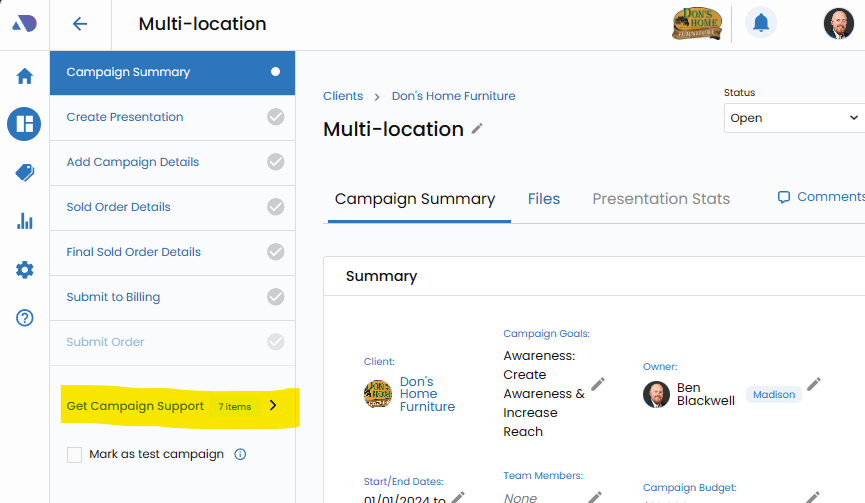
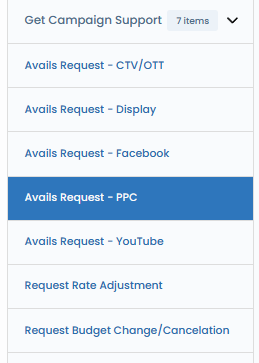
Click the Avails Request PPC Workflow.
Within the Campaign Support Area, locate and click on the "Avails Request PPC Workflow."
This specialized workflow serves as the gateway to harnessing the expertise of Affinity X Digital campaign managers, ensuring a seamless and collaborative approach to PPC campaign planning.
Complete the Avails Request Form.
A pivotal step in the process involves completing the Avails Request Form. This comprehensive form acts as a canvas to capture essential details required for creating accurate forecasts.
Ensure that all the required fields are meticulously filled out, providing the necessary information to guide the campaign managers in tailoring their recommendations.
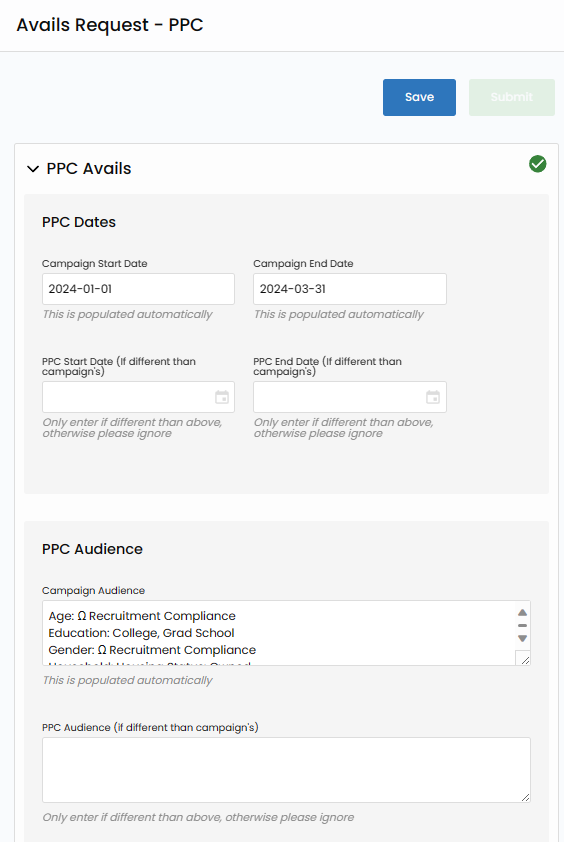
Click Save.
Having filled out the form with the relevant details, click the "Save" button.
This action ensures that your edits and inputs are securely stored within the system, allowing for seamless retrieval and reference in the future.
To submit, please continue.


Click Submit.
With your Avails Request Form duly completed and saved, take the next decisive step by clicking the "Submit" button.
This action initiates the process of transmitting your request directly to the adept campaign managers at Affinity X Digital.
It signifies the formal submission of your requirements for their insightful analysis and expert recommendations.